What's new: September 28 - October 4, 2026

We’re getting Roma ready for launch. So this week we focused on helping new users get started on their own. And since you asked for it, every new task now kicks off the work right away.
A new onboarding experience
As we get ready for launch, our final pass was about preparing Roma for new users. We wanted people to be able to get started on their own and see what happens when they give Roma a task.
The new welcome experience starts with guided examples instead of an empty list. Try something like Plan a Group Dinner, and Roma creates the task, researches nearby restaurants, and drafts a message to invite friends. It is a simple way to see how Roma can take a task and get to work before you add one of your own.
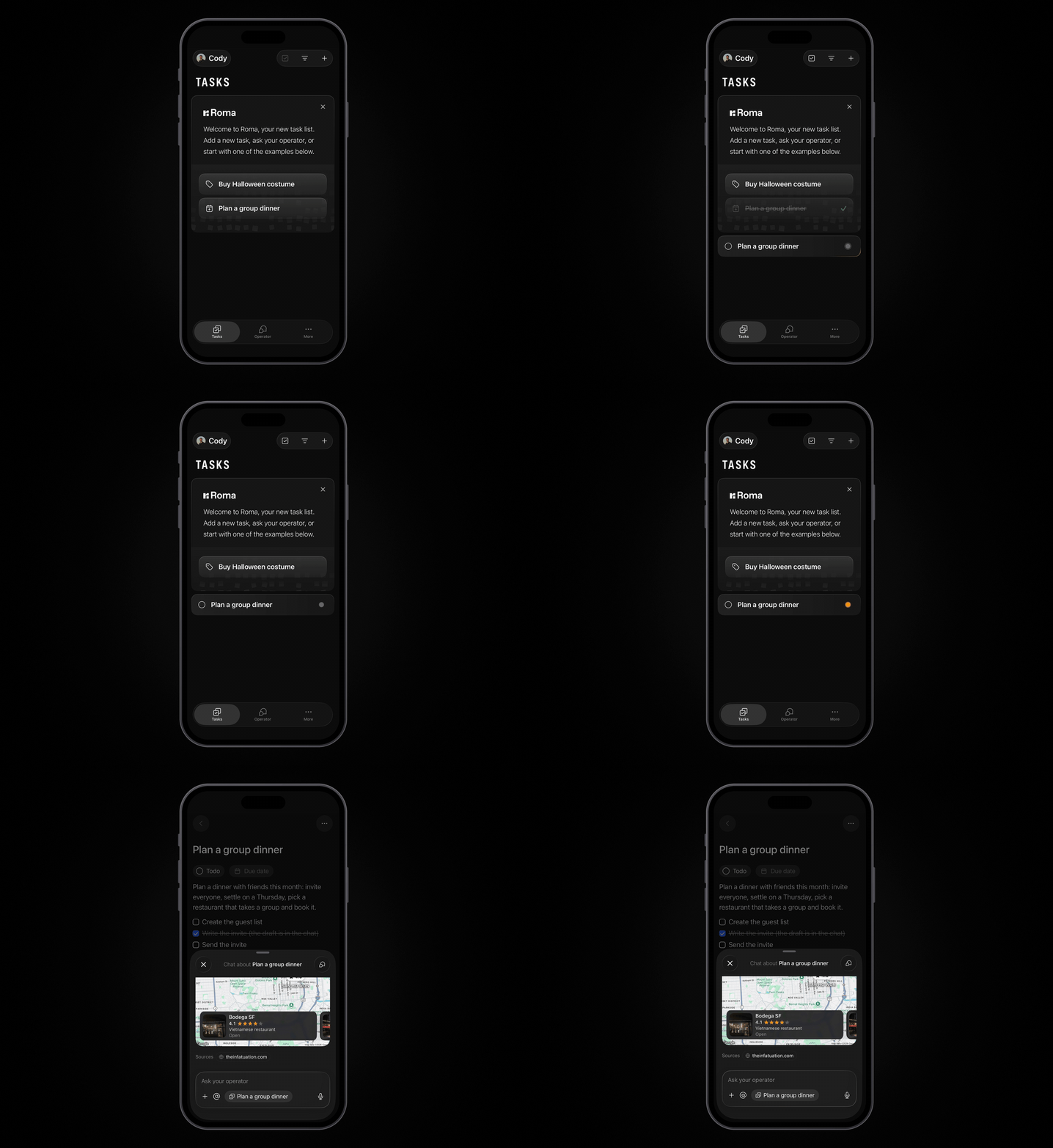
Every new task gets to work
Until now, Roma only kicked off the work automatically when you created a task through the Operator. We heard you loud and clear and changed that.
Now, no matter how you add a task, Roma gets to work. Type it like a traditional to-do list, or use voice and natural language. Roma cleans up the title, understands details like your project and due date, and kicks off the background work.
If the Operator needs more to go on, it will ask a question first so it can get going on the right work.
A lighter, faster task experience
Roma now starts with just your task list and the Operator. Everything else is still available in More, but the main experience is simpler and faster.
Your task list is more compact, so you can see more of your day at once. You can change the view if you like. Drag and drop is smoother, with haptic feedback. You can quickly update a task’s due date or status, move it, or swipe to delete it.
Open any task and its chat peeks into view, so you can immediately see the latest status and message on the work being done.
It all works on Mac too, with the same task list and fast flow, plus more room to see your work and pick up where you left off.
A new look for Roma
We’ve also given Roma a fresh new look across web, Mac, and iPhone, including a new logo, wordmark, and app icons. You can choose the app icon you prefer in Settings on iPhone and Mac.
All updates
New Roma logo, wordmark, and app icons across web, Mac, and iPhone, with app-icon choice in Settings on iPhone and Mac. (iOS, Desktop, Web)
The welcome experience starts with three example tasks instead of an empty list. (iOS, Web, Backend)
A first-task card guides you through creating your first task, your plan, and a daily check-in. (iOS, Web, Backend)
Every newly created task can immediately start an Operator handoff, with cleaner task titles and automatically understood dates and projects. (iOS, Web, Backend)
The iPhone app now opens on Tasks, with Tasks, Operator, and More as the default tabs. (iOS)
Compact task rows are now the default across Roma. (iOS, Web)
Tasks and project pages share one list system, including smoother drag-to-reorder, custom sorting, haptic feedback, and reliable first drops. (iOS)
The new-task row now appears and dismisses smoothly, and the add menu consistently offers tasks, notes, and projects. (iOS)
Open a task or note to see its chat in a peek sheet, with a clear choice between task-specific and global chat. (iOS, Web)
Tab switching is faster, and iPhone performance after long periods in the background is improved. (iOS)
Messages sent just before your phone locks are preserved and can be retried if needed. (iOS, Backend)
Task and note bodies now reliably load on iPhone. (iOS)
Task rows now have clearer quick actions, improved selection, better swipe-to-delete behavior, and tap-to-advance status. (iOS)
Settings has a refreshed layout with account details, News, Changelog, Feedback, and app-version information. (iOS)
Completed tasks now show compact rows, newest first, with status and direct access back to the task. (iOS, Web)
Your own Markdown links now render as links in chat. (iOS)
Search and Recents now use one ranking model that better weighs match quality and what you use most. (iOS, Web, Backend)
The command palette can open results in a new tab with Cmd+Enter or Cmd+click. (Web, Desktop)
HEIC images can now be pasted, dropped, or selected in chat and page bodies on Chrome and the Mac app. (Web, Desktop)
Mention chips now keep their live titles, and Cmd-clicking a body link opens it in a new tab. (Web, Desktop)
Chat keeps your draft while you switch between task-specific and global context. (iOS, Web)
Chat rendering is more polished, with better prose grouping, spacing, pending states, reactions, action rows, and sign-in cards. (iOS, Web)
Roma’s public landing and download pages have been updated for launch, including direct downloads and the iPhone app listing. (Web)
Google Maps and place search are now available to everyone. (iOS, Web, Backend)
Memory is now available to everyone, with a redesigned Memory page where you can review, ask about, and correct what Roma knows about you. (iOS, Web, Backend)
Say “undo that” after an Operator or expert edit to restore the previous version, with version history showing who changed what. (iOS, Web, Backend)
Continue a conversation in an existing task or note, with a link back to where it started. (iOS, Web, Backend)
Roma now has an API, API keys in Settings, and developer documentation. (Web, Backend)
Onboarding automation offers for Mail and meeting prep have been updated. (iOS, Web, Backend