What's new: July 27 - August 2, 2026
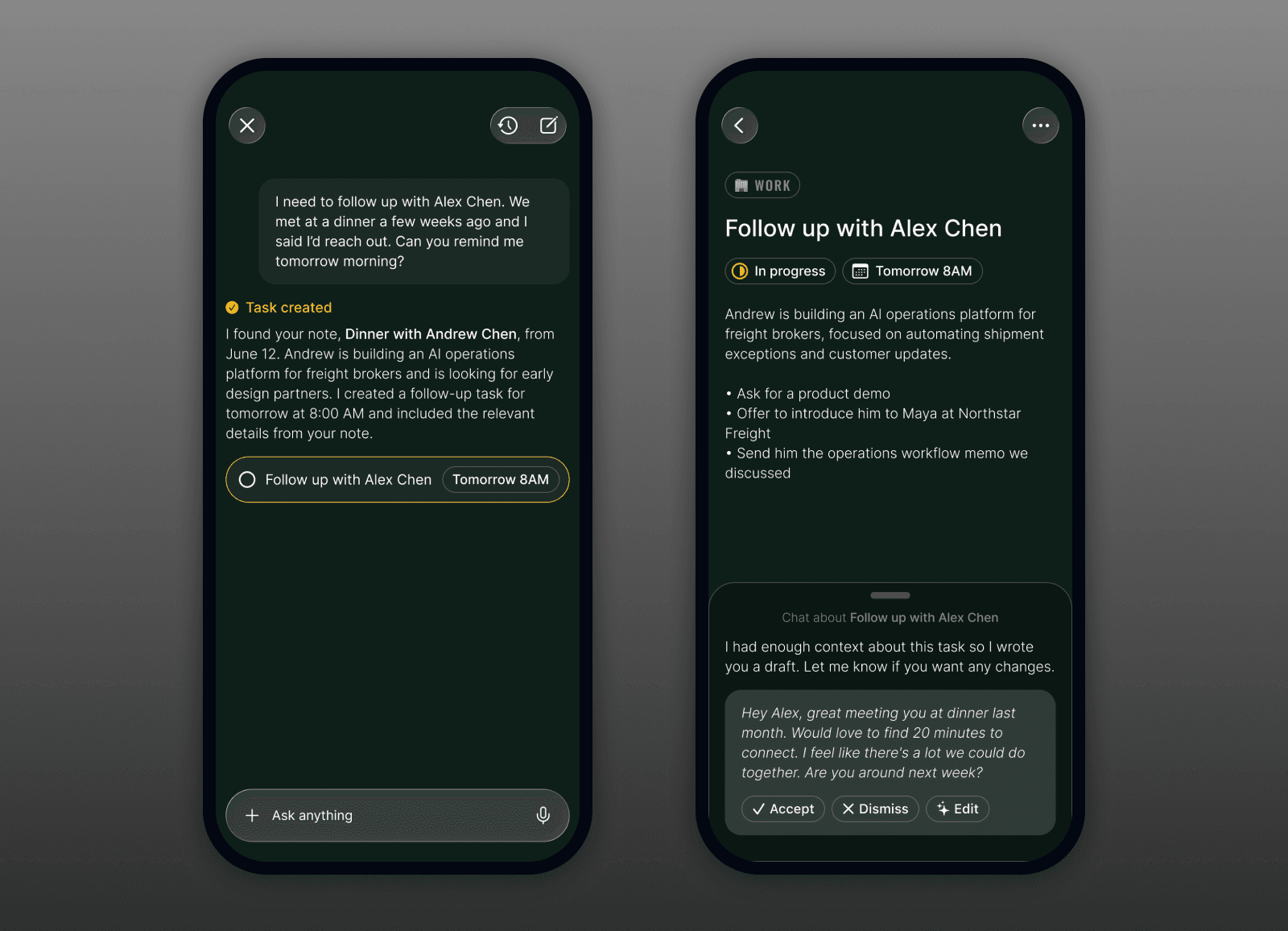
Another big week, and a big one for what Roma can do on its own: it can now prepare work on a task before you ask, search comes to iPhone, you can watch your words transcribe live, and there's a safety net if the assistant ever overwrites a note.
Highlights
Task Assist, or Roma getting to work before you ask. Create a task and Roma can start on it for you, pulling together a research brief or drafting the thing you need, then hand it back as a card right inside that task's chat. You glance at what it prepared, accept what's good, and it's done. It's the difference between a list that just remembers what you owe and one that actually moves work forward while your phone's in your pocket. (All clients)
Search comes to iPhone. Find anything in a tap. iOS now has a fast, local-first search surface, so your tasks and notes are a quick search away instead of a scroll. (iOS)
Watch your words as you speak. Voice capture on iPhone now shows your transcript live as you talk, in both Quick Capture and the Operator. No more staring at a waveform and a "Transcribing…" pause wondering if it heard you. The words just appear. (iOS)
A safety net for your notes. The Operator can do a lot to your notes now, so we added a way back. If the assistant ever overwrites a note's contents, you can restore the previous version, and a new guard stops it from replacing a whole note in the first place. Your writing is safe. (All clients)
All updates
Task Assist: Roma can prepare work on a task (research briefs, drafts) and offer it as a card in the task's own chat for you to accept or dismiss (All clients)
Search on iPhone: a fast, local-first search surface for your tasks and notes (iOS)
Live transcription on iPhone: your words appear as you speak in Quick Capture and the Operator (iOS)
Note version history: restore a note's previous contents if the assistant overwrites it, plus a new guard that blocks a full-body replace (All clients)
One global composer on web and the Mac app: a single create modal, ⌘N that works on every screen, and the project picker no longer disappears on a project page (Web + Desktop)
A more dependable Operator: turns now survive a dropped connection, duplicate tasks are gone, markdown renders correctly instead of as literal text, converting a task or note keeps its chat and its current type, and the Operator now respects the current time and your timezone (All clients)
Share images straight into the Operator with a new share extension, plus image and voice-record buttons in the editor bar (iOS)
Long-press to reorder and open the context menu across all your lists, with a temporary Custom sort (iOS)
Report an issue from right inside the app (iOS)
Tasks resolve in place: the "Processing" shimmer card is gone, and a task just fills in when it's ready (iOS + Web)
Pull to refresh on your main list, plus a fix for live updates silently stopping (iOS)
Fresh tasks now show much faster when you open or return to the app (iOS)
Operator example prompts are now task-first and tailored to whatever you're looking at (All clients)
A cleaner iPhone home: a full-width Operator pill, a simpler creation view, and a create button in the top bar (iOS)
Artifact detail now uses one consistent "Chat about" launcher instead of three different bottom bars (iOS)
The web due-date picker always shows Set a time and Remind me and stays open after you pick a date, and a plain due date no longer arms a reminder on its own (Web)
Cmd/Ctrl-click the Tasks and Notes sidebar headers to open them in a new tab (Web)
The Tasks section shows a proper empty state when you clear the day instead of going blank (iOS + Web)
Smaller iPhone fixes: a bigger tap target on the launcher mic, task rows stay tappable after a type change, dismissing the Operator keeps your draft (with a confirm), short chat messages hug their text, and the composer's attachment strip moved above the input (iOS)