What's new: August 31 - September 6, 2026
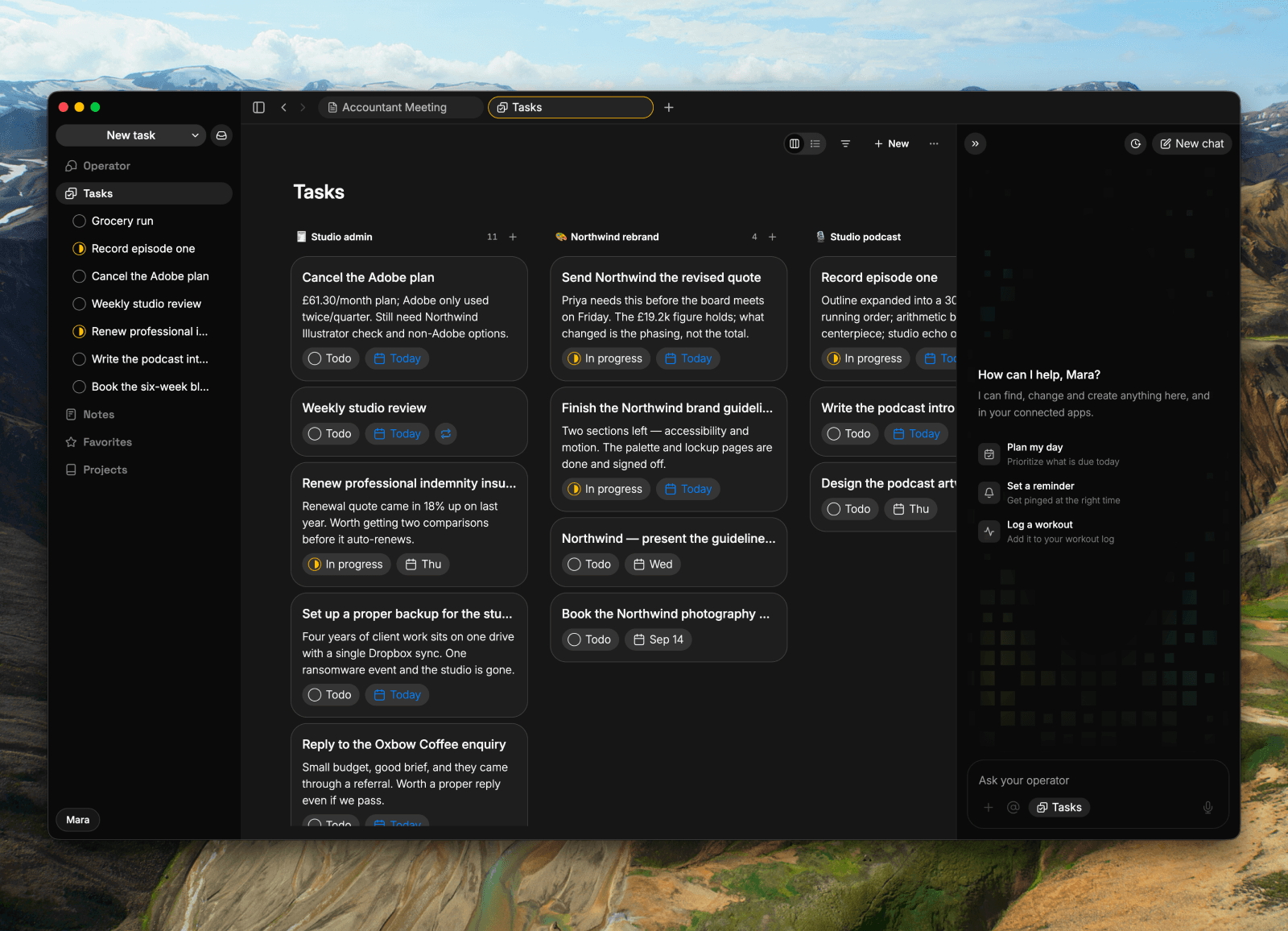
A huge week for making Roma feel more like a place where work gets done: new task and note flows on Mac, board views, a rebuilt chat with an Operator you can steer, and safer notes.
Highlights
Tasks now have a board view. The Tasks page gets a Kanban board view, with a simple list and board switcher, and new accounts land on the board by default. Tap a card's status to move it along, and a completed card sticks around for ten seconds so a mis-tap is easy to undo. (All clients)
New tasks and notes open straight into the work. On the Mac app, choosing “New Task” or “New Note” now takes you directly into the detail view, with a new Operator button and an updated sidebar alongside it. (Desktop)
The Operator now keeps working with you, not around you. Send a follow-up while it is still working to steer it, or stop it when you change course. And when it responds, it can answer in plain prose with linked @-style chips instead of stacking separate cards. (Web + Desktop + Backend)
All updates
Every message is a bubble, yours on the right and the Operator on the left, with react and reply on all of them (All clients)
Messages render formatting and @-mention chips wherever they appear, including on iOS (All clients)
Your global chat and your per-item chats are properly separate on every client, so a conversation about one thing no longer surfaces under another (All clients)
Long conversations load fast and open at the newest message, with no blank transcript and no flash of the previous chat (All clients)
One composer shape: draft on top, context inline, @ on the row, and your text and attachments kept when you switch tabs (Web + Desktop)
Ask the Operator what you created, completed or changed over any time window and it can answer (All clients)
The Operator attaches an image to an item only when you ask it to (All clients)
Multi-line replies and status lines keep their line breaks (All clients)
Tool calls in chat now show live progress, narration, expandable steps, results, and errors without the layout jumping around (Web + Backend)
Chat can answer with prose and linked @-style chips instead of separate card stacks (Web + Desktop)
You can steer a running Operator turn by sending a follow-up mid-reply, and Stop now ends the turn server-side with a clear stopped-response state (Web + Backend)
Images stay attached to the chat turn they came from instead of appearing in a different conversation (All clients)
Voice captures use cleaned-up text instead of saving literal rambling as the task body (All clients)
Lists can now move into and out of projects (All clients)
The tasks page has a board view, with the list/board switcher and filters in the top-right action bar (Web + Desktop)
Tap a task to advance its status; completed rows stay visible for ten seconds before they go (All clients)
New task and New note each open their own tab as a draft you can chat with, and the title you type appears live in the tab and the sidebar (Web + Desktop)
A new item shows its project pill so filing it is one click away, and a task created from a project page lands in that project (Web + Desktop)
Completed task rows now strike through and mute their status line as well as their title (All clients)
Collections: 500-row lists scroll, drag and edit smoothly, a new row in a filtered view stays put, and a checkbox toggle applies to the row you clicked (All clients)
Cmd-click a collection row to open it in a new tab (Web + Desktop)
Collection rows now appear without a manual refresh, and collection permission and detail failures report clearly instead of silently dropping edits (iOS + Backend)
The Operator's bubble is visible in dark mode, and transcript text is selectable and copyable (iOS)
Typing in a long note or task body no longer lags, and dictation inserts at your cursor instead of the end (iOS)
The @ picker is reachable from the markdown bar instead of hiding behind the keyboard (iOS)
Calendar times stay readable, chat opens already at the newest message, and the recent-chats sheet uses a plain list (iOS)
Fixed the freeze when returning from the background and the crash when tapping a notification (iOS)
Action Button voice can auto-send when you stop speaking (iOS)
Open a task's details in chat (iOS)
Sidebar section headers open their page; the chevron handles expanding and collapsing (Web + Desktop)
Notes and Collections appear for new users once they have content, and the home segments work from day one (All clients)
The greeting card shows your full day and taps through to your calendar (iOS)
Dark mode is truly black, with the previous dark theme available as "Slate" (All clients)
A global shortcut opens a quick capture that hands off to the Operator in the background (Desktop)
Copy an image to your clipboard from the attachment menu or the lightbox (Web + Desktop)
⌘-click a notification or a row to open it in a new tab (Web + Desktop)
A new account's first launch opens the welcome task and the tasks board together (All clients)
Clearing a note or task body takes real intent now, so a body can't be wiped by a sync (All clients)
A refused body clear no longer blocks everything queued behind it on iOS (iOS)
Sync status is one quiet icon with a hover card instead of a running commentary (Web + Desktop)
Task Assist delivers without the eight-second wait (All clients)
Opening a body no longer marks the item as edited (All clients)
The Operator follows the language of your latest message, renders headings and bold text correctly, keeps checklist additions inside their checklist, and no longer repeats full task lists beneath result cards (All clients)
Collection rows and mentions link correctly in Operator answers, near matches are called out, and stale or blocked result text is removed (Web + Backend)
Dates in Operator replies use the same readable format as the rest of Roma, and updates in an open item use a short confirmation instead of repeating the entire item (All clients)