What's new: August 24 - 30, 2026
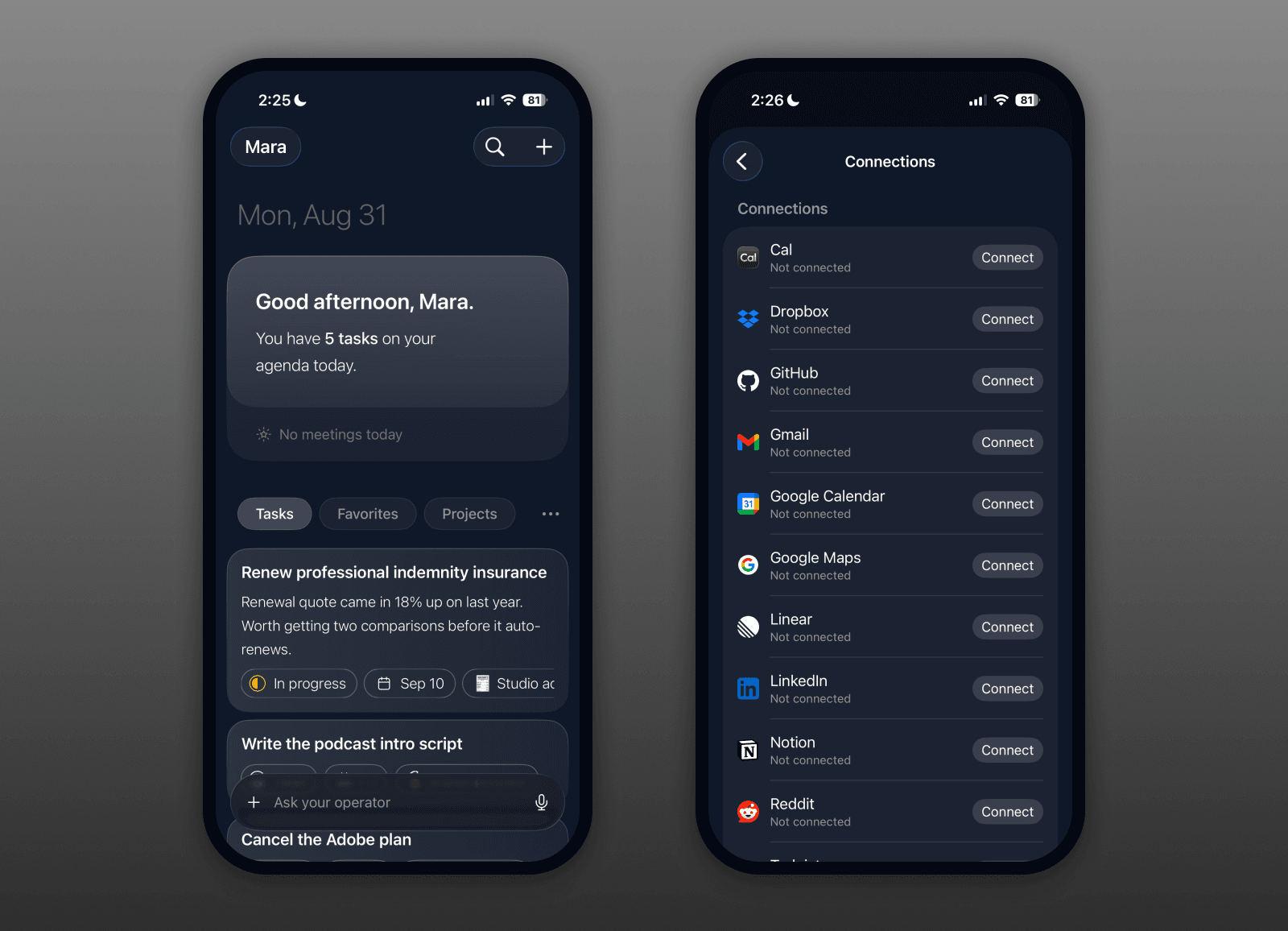
A huge week, and the headline is connections. Roma now plugs into the apps you already live in, and this week that whole system got real. On top of that, your iPhone gets a brand-new home, every task row learns to summarize itself, and there's a deep round of stability work underneath it all.
Highlights
Roma connects to your whole stack now. Gmail, Google Calendar, Linear, Notion, GitHub, LinkedIn, and more: the Operator now has over two hundred vetted actions it can take across your tools, up from a handful, so it can actually get things done where your work already lives. Your permissions are honored, so when you say never, it means never, and a broken connection reconnects instead of quietly failing. This is the foundation for Roma reaching into everything you use. (All clients)
Your iPhone home is brand new. Open Roma on your phone and you land somewhere completely different: a warm glowing backdrop, a greeting up top, your day's calendar, and your tasks and notes as clean glass cards. The Operator sits in one chat bar with an @ button and context pills, so starting something is a tap and a sentence. Set your own background while you're at it. It's the iPhone catching up to the web home, and then some. (iOS)
Your task rows tell you what's inside. Every task now carries a one-line summary, so glancing down your list actually tells you something. If the Operator worked on a task and you haven't read the reply, that line is the gist. Otherwise it's a quick read of the task's own notes. Less wall of titles, more wall of answers. (All clients)
Hold to talk on the Mac. Hold a key, say what's on your mind, let go, and your quick chat sends itself to the Operator in a new background tab. No tapping a mic, no reaching for send, just talk and release. It's the fastest way to hand something off when your hands are busy or the thought is half-formed. (Desktop)
All updates
Roma now connects to Gmail, Google Calendar, Linear, Notion, GitHub, LinkedIn, and more, with over two hundred vetted actions the Operator can take across them (All clients)
Your permissions are honored: tell the Operator never to do something in an app and it never does (All clients)
A broken app connection reconnects instead of silently failing (All clients)
When the Operator uses a connected app it now shows the right logo and name (All clients)
More of your Google calendars now show, not just your primary one, chosen in Settings under Connections (All clients)
The iPhone calendar card stops showing meetings that already happened and refreshes while the app is open (iOS)
The iPhone Connections page shows app icons again, and iPhone connections are now at parity with the web (iOS)
A brand-new iPhone home: a warm gradient, a greeting card, your calendar, glass cards for your tasks and notes, a segmented menu you can reorder, and a background picker (iOS)
A single unified chat bar on iPhone with an @ button, an inline context pill, and a scrollable mention picker (iOS)
New Operator empty states on iPhone: a welcome card with rotating example prompts (iOS)
New backdrops behind the Operator home, with Glow on by default (Web + Desktop)
Hold to talk on the Mac: hold a key, speak, release, and your quick chat sends itself to the Operator in a new background tab (Desktop)
When the Operator needs to choose between options, it now asks you in plain prose instead of popping up option cards (Web + Desktop)
The Operator now opens a fresh chat instead of your last one, from both the composer and the Action Button (iOS)
New Action Button voice option: it auto-sends when you go quiet (iOS)
iPhone no longer posts a duplicate Operator reply, thanks to a proper send queue (iOS)
Retired the pinned-chat mode: the chat now always follows your view (Web + Desktop)
The Operator no longer leaks internal names in its replies (All clients)
Unread Operator replies show a clearer pulsing mark on task rows, on every client (All clients)
The mention picker hides the native list when nothing matches (All clients)
Fixed duplicate final Operator messages, a response loop that blocked note approval, and endless content rendering (iOS)
The chat composer got a batch of small fixes: steadier height and keyboard behavior, a caret and placeholder fix, and it no longer overlaps the logo as it grows (Web + Desktop)
Task rows now carry a one-line AI summary: the gist of an unread Operator reply, or a quick read of the task body (All clients)
Sidebar task rows show a task's time when it has one (Web + Desktop)
Collection items get a full detail view with their own chat, so you can work a single row with the Operator (All clients)
Big collections no longer lag on scroll, drag, or edit (All clients)
Search finds collections on your phone, including ones not filed under a project (iOS)
Project pills show collection counts, and a collection row's heading and detail scroll are fixed (All clients)
Activity is now a real feature, not an admin screen: a plain-language history of what you created, updated, archived, or deleted, with every entry linking back to the item (All clients)
A cleaner, warmer look: refreshed light-mode colors, a real app-wide type system, and roomier text (All clients)
Fixed production bugs that could blank out a note's body, and added a guard so clearing a body now takes real intent (All clients)
Fixed the crash when you tap a notification (iOS)
Fixed the iPhone freeze when returning from the background (iOS)
Image-attachment views scroll normally again (All clients)
Raw text no longer lands inside a task body (iOS)
A task ending in a checklist no longer jumps to the top of your list when you open it (Web + Desktop)
Completed and archived tasks are reachable again from search and Settings (All clients)
An attachment image no longer shows a broken placeholder until a hard refresh (All clients)
New accounts get a proper "Building your account" screen instead of a broken-looking skeleton (All clients)
Settings renames: "AI Permissions" is now "Permissions," and "What AI knows" is now "Profile" (All clients)
The due-date chip tells the truth again: clear glyphs, and a reminder shows its hour (All clients)
The iPhone keyboard stays hidden when you toggle a checklist (iOS)
Cmd-N preselects the project when you're on a project page (Web + Desktop)
Smaller polish: the version-history dialog no longer overflows, the sidebar time-pill sits right, and the iPhone project pill gets cleaner chrome (mixed)