What's new: August 17 - 23, 2026
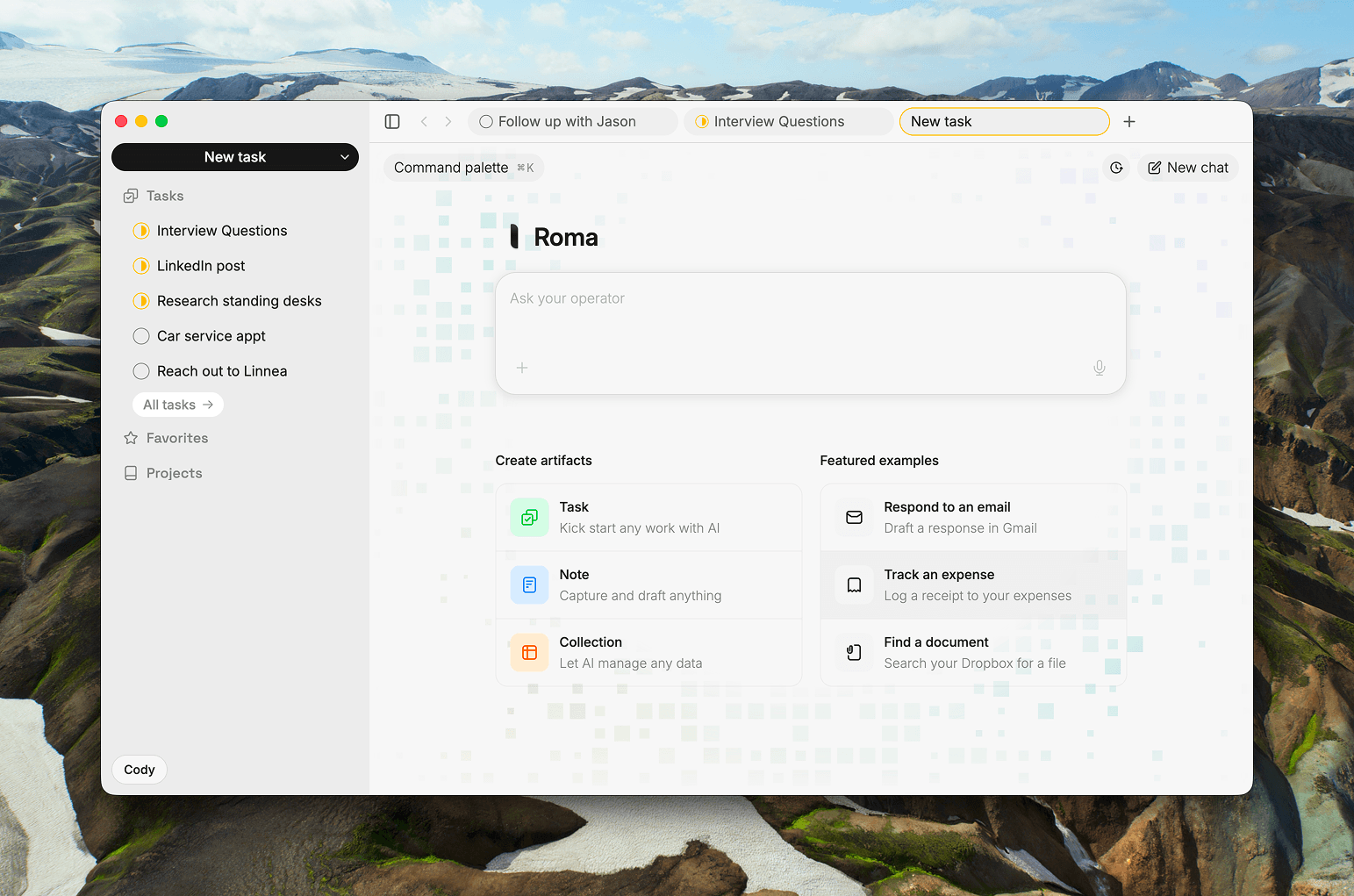
The biggest week in a while, and it opens on something new: a brand-new home screen built around the Operator. Task Assist can now ping you the moment your work is ready, a wide reliability sweep makes the whole app feel steadier, and there is a fresh new look on top.
Highlights
Your home screen is brand new. Open a new tab and you land on a whole new home for Roma, built around the Operator. Your assistant sits in the center under a simple greeting, ready the second you start typing or talking, with your recent work just below it. One tap starts a task, a note, or a collection, and a few example prompts (log a workout, break down a project, add something to a watchlist) give you somewhere to go when you're not sure where to begin. The emptiest moment in the app just became the fastest way into it. (Web + Desktop)
Task Assist tells you when it's done. Kick off some work in Task Assist, put your phone down, and Roma will let you know the moment it's ready. You get a notification when the research brief or the draft is waiting for you, so you're never sitting there watching it think. People asked for exactly this, and it's the piece that makes Task Assist feel like handing something off instead of babysitting it. Ask for the work, walk away, come back to it done. (All clients)
A big reliability sweep. This week went heavy on the unglamorous stuff that makes an app feel solid. Numbered lists stop restarting at one, the list buttons stop turning your headings into bullets, and sync got honest about what actually failed and gave you a way to retry it. The Mac app stopped rewriting the tab you had open at launch, and a repeating task you check off finally completes instead of quietly refusing behind the scenes. None of it will make a demo, but it's the difference between an app you use and one you trust. (Web + Desktop)
All updates
A brand-new home screen: open a new tab and the Operator is centered under a greeting with your recents below, one-tap starts for a task, note, or collection, example prompts to try, and a first-run teaching canvas for new accounts. The tab strip is tidier too: new tabs open at the end, titles type themselves in, switching tabs swaps the chat instantly, and the task status circle is clickable (Web + Desktop)
Task Assist now sends a notification when your prepared work is ready (All clients)
A fresh look: a unified card for tasks and notes, a new greeting on iPhone, refreshed sidebar, tabs, and chat panel, and a cleaner color palette (All clients)
Recents now rank on what you open, not just what you edit, so something you keep coming back to stays near the top (All clients)
The Operator chat rail is now its own surface, one step off the page, so the conversation sits clearly apart from your work (Web + Desktop)
@-mentions now reach your collections and tell a repeating task apart from its instance, and you can open a mention in a new tab (Web)
On iPhone, the chat is now a proper native sheet with a cleaner composer, and the assistant shows its thinking live as it works (iOS)
Collections follow-ups now that they are live for everyone: the Operator can show a collection card in chat, collection edits count as edits, and changing a column's type no longer wipes your cells (All clients)
Sync you can read at a glance: the indicator moved out of the way, is honest about healthy versus stalled saves, and shows what failed with a way to retry it (Web + Desktop)
Editor fixes: numbered lists stop restarting at one, list buttons no longer turn headings into bullets, select-all paints its highlight, the quick composer scrolls instead of overflowing, and focus mode uses the right background again (Web)
The Mac app is hardened: cold launch no longer rewrites your restored tab, attachment images load again, and dev builds can no longer poison a release (Desktop)
A repeating task you complete now actually completes, instead of parking forever (Web + Desktop)
Opening a new tab, switching accounts, or reloading no longer drags another session's chat or stale tabs along (Web + Desktop)
A note that failed to sync to the server now syncs (All clients)
Due dates with a time now sort above day-only tasks on the same day (All clients)
Set a due date from the right-click menu now opens the same picker as the due pill, and the composer's date shortcut opens the composer's own picker (Web)
A collection no longer briefly shows only its newest row while syncing (Web + Desktop)
Sidebar and Operator shortcuts keep working while your cursor is in the chat, and holding Cmd or Ctrl on a recent in the command palette opens it in a new tab (Web)
The account menu links to News, Learn, and Changelog, and the marketing pages stop shifting sideways as you move between them (Web)
Home task rows on iPhone open from the whole row, not just the title (iOS)
Small polish: the sidebar New task button matches the rows below it, and context menus stop wrapping "Remove from Favorites" onto two lines (Web)