What's new: August 10 - 16, 2026
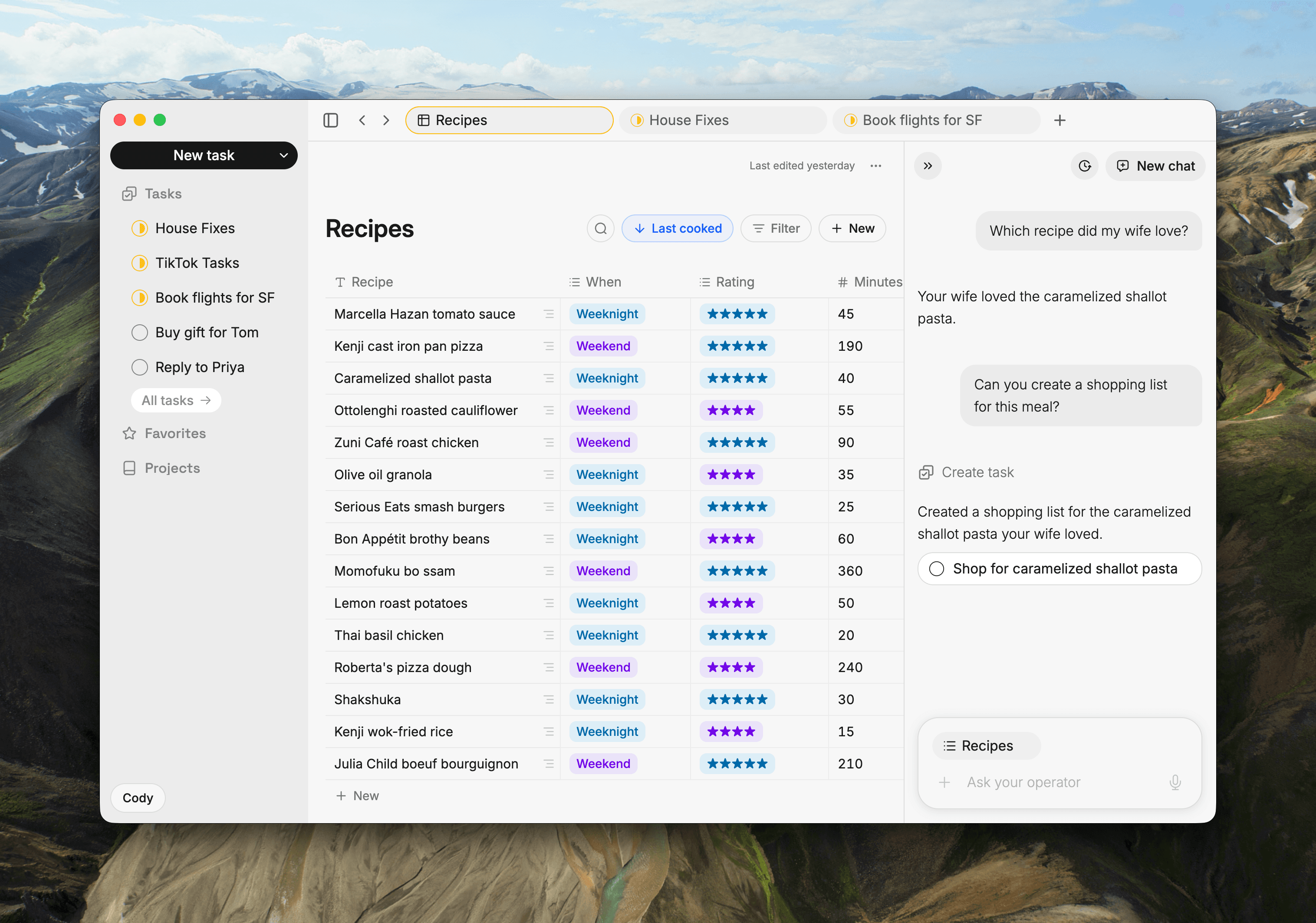
A big one. Collections became the place your finished work lives, the Operator got much better at knowing what you're talking about, and a long run of fixes landed across iPhone, web, and the Mac app.
Highlights
Collections: idea, task, kept forever. You capture a thought, it becomes a task, and the Operator helps you work it out. Now Collections are where the result lands and stays in perpetuity: the reading list, the recipes worth making again, every workout you logged. It's a real table too, with sort and filter saved onto the list so it looks the same on your phone tomorrow as it did on your laptop tonight, search across every row, images on rows, and every column equal: any type, reorderable, deletable. Build the list your data actually wants. (iOS + Web + Desktop)
Highlight it, then work on it. Select a paragraph in a task or a note and it lands in the Operator, still lit up on the page. The same words, in both places, at the same time. Ask it to tighten that paragraph or turn it into a plan, and what comes back is about those sentences exactly. Point at what you mean, and get straight to work. (Web + Desktop)
Operator context pills. Everything the Operator is working from sits as a pill in the chat bar: the document you're in, plus your selection when you have one. Pull the selection off and it animates back to the whole document, deselecting the text on its way out. One glance tells you exactly what your next question will land on. (Web + Desktop)
All updates
Collections: sort and filter with one saved view that follows you across devices, plus keyword search across every row from the toolbar (iOS + Web)
Collections: every column is equal now, any type, reorderable, hideable, deletable. New lists start with a plain Name column you can rename or delete, a row is simply its cells (its first filled cell names it in search and Activity), and your existing lists came through unchanged, with each row's old title now in a normal editable column (Backend, Web + Desktop; iOS in the next app update)
Collections: rows carry image attachments like notes and tasks, url cells render as tidy link pills, and changing a column's type keeps your content wherever possible and tells you in advance when it cannot (Backend, all clients)
Collections: import from Notion, with select and multi-select columns landing cleanly as text (Backend, all clients)
Collections tables on web: full width, one-line rows, everything inside the content edge, clean scrolling under the top bar, a scrollable select dropdown, Reset in the overflow menu, smooth column dragging and tab opening, one sidebar entry, and consistent project assignment with Unsorted always reachable (Web)
Collections on iPhone: one horizontal scroll carries every column, new rows appear as you add them, and replacing a row works (iOS)
Connect Roma to your own AI agents: collections can be updated, deleted, restored, and pulled back out of the trash. Images can be added to rows from a link, imports report exactly which image failed and why, and rows insert by default, so name the column that identifies a row when you want a re-run import to merge (Backend, all clients)
The Operator composer shows what it is working from as a pill, and animates to your highlighted text when you select some (Web + Desktop)
Mention any note, task, or project with @, inside a document or in the Operator (iOS + Web)
The Operator answers faster: time to the first word dropped from about nine seconds back to under two (Backend, all clients)
Every delete of your content asks first (iOS + Web)
Operator on iPhone: welcome pills fill the chat bar on tap, the transcript survives backgrounding the app, a mic tap starts a new chat when that is your default, replies render as clean prose, and long drafts get a full-width composer (iOS)
Operator on web and Mac: text selection is clearly visible, one clean placeholder, long links stay inside the message, the rail's label matches the conversation you're reading, the composer is ready to type the moment the rail opens, and a document's own chat stays tidy as you update it (Web + Desktop)
The Mac app works with no internet: cold boot from cache, documents kept available offline, queued edits retried, and a clear offline indicator. It also recognizes your account reliably, closes and auto-updates cleanly, keeps your profile through a rough start, and its title-bar collapse and lightbox buttons respond (Desktop)
Offline behavior audited end to end on iPhone (cold launch, cache coverage, sync queue, offline indicator), and an open document stays readable while offline on web and the Mac app (iOS + Web + Desktop)
iPhone feels faster: the roughly one-second lag on the due-date pill is gone, along with the scroll hitches down the main list (iOS)
Your menu only shows what you use: Notes and Collections are opt-in under Display, and Projects appears once you have one (All clients)
One icon set now spans iPhone and web with every surface drawing from it, and every top bar sits at one height and baseline (iOS + Web)
Task Assist peek on iPhone opens at the right height, expands smoothly, and holds its content through a swipe (iOS)
Voice notes transcribe more accurately (iOS)
Editor: Backspace after Enter on the last list item keeps the bullet above, Enter capitalizes new list items, Backspace on an empty first line moves the caret into the title, checklist checkboxes tick, and moving a multi-item selection carries all of it (iOS + Web)
Tabs: one tab per document after a hard refresh, clean switches, and tab cycling is back in the Mac app (Web + Desktop)
Command palette is wider and roomier with a Recent group, and opening a note leaves it exactly as it was, keeping its place in the sidebar (Web)
Roomier layout: the Operator and sidebar width caps are gone so the body shrinks instead, task rows in lists are single-line, and body content scrolls cleanly under the metadata pills (Web)
Project is editable straight from the task row, and lives in a single pill row in the detail view (iOS)
A newly created task carries the right label in the composer, the Windows Chrome sweep landed (landing page, theme default, Operator pill), and the photo picker's selection checkmark is clearly visible (iOS + Web)