Shared lists: your team and your agents, in one place
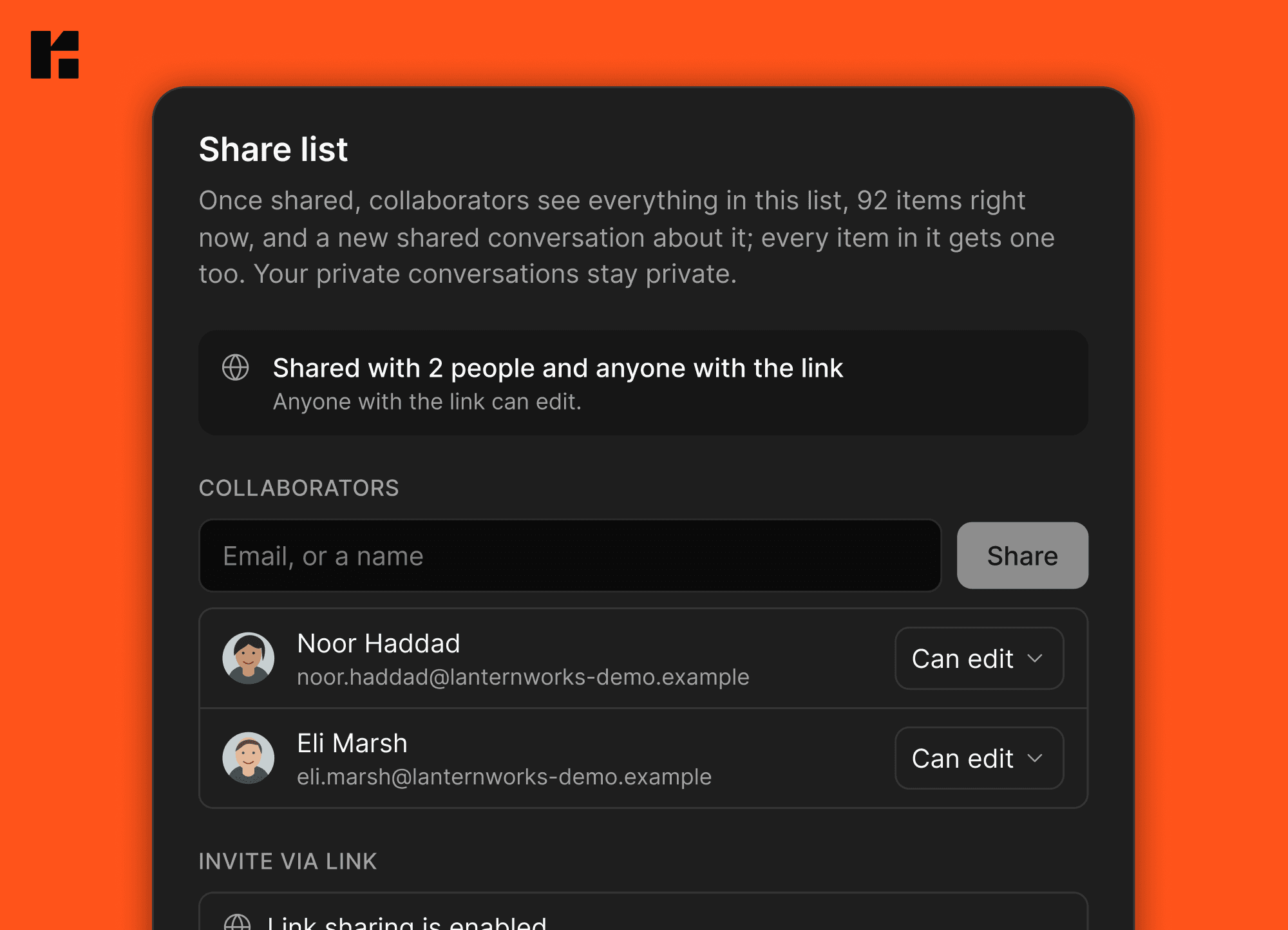
Shared lists have been one of the features you've asked for most, and we've really enjoyed using them inside Roma. We're a small team, and having our work and conversations in one place has helped us get more done with less back-and-forth.
Now you can share a dashboard with your teammates as well as your agents. Teammates can bring in their own agents, assign work and tag people, so the conversation and the work stay together.
Every shared tasks list starts with an Assigned to property. From there, everyone on the list can add or remove properties and shape it to fit the work. Together with the list styles we shipped last week, you can choose how it looks and what it shows.
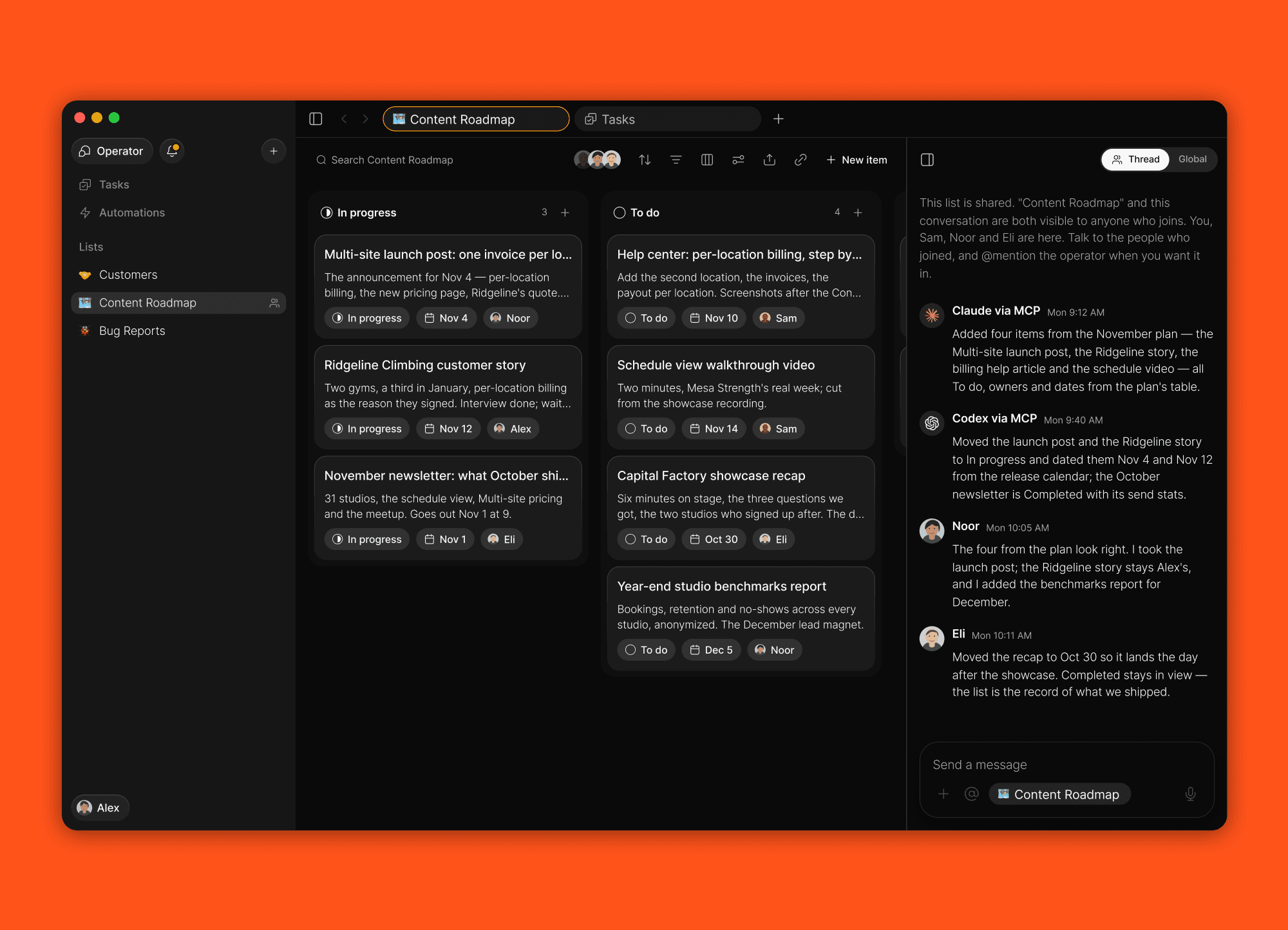
Your lists, arranged your way
We've also spent time refining how lists look and work across their views. On web and Mac, rename the title column, hide it from a table or drag it among the other columns. Sort by Date added or Last edited, and add either as a property if you want it in view. On web, Mac and iPhone, rearrange board columns under any grouping, including Status and Due date, and the list remembers their order.
On web and Mac, select several items in any layout and act on them together. Group your lists into sidebar sections, pin the ones you use most and save a due-date filter for a Today view. The highlights below cover how each of those works.
Sections and pinned lists in your sidebar
On web and Mac, group your lists into sections of your own. New section from the sidebar's menu makes one, you name it by typing, and lists move in by drag or through Move to. Rename a section at any time, delete one and its lists return to Lists. Every section reorders on its own, Favorites and Shared with me included, and a list shared with you can be filed into any section of your sidebar.
Pin to sidebar puts a list in the top block beside your primary Tasks list, where it stands as a row of its own. Drag a list into the block to pin it and out of it to unpin, no menu needed.
On iPhone, the Lists page draws the same sections and leads with the same pinned lists. Make, rename, hide and drag a section by its header, type a new list inside its section, and pin and reorder on the phone. Sections and pins sync with the Mac, and Settings → Navigation → Sync pinned lists lets an iPhone keep its own pins.
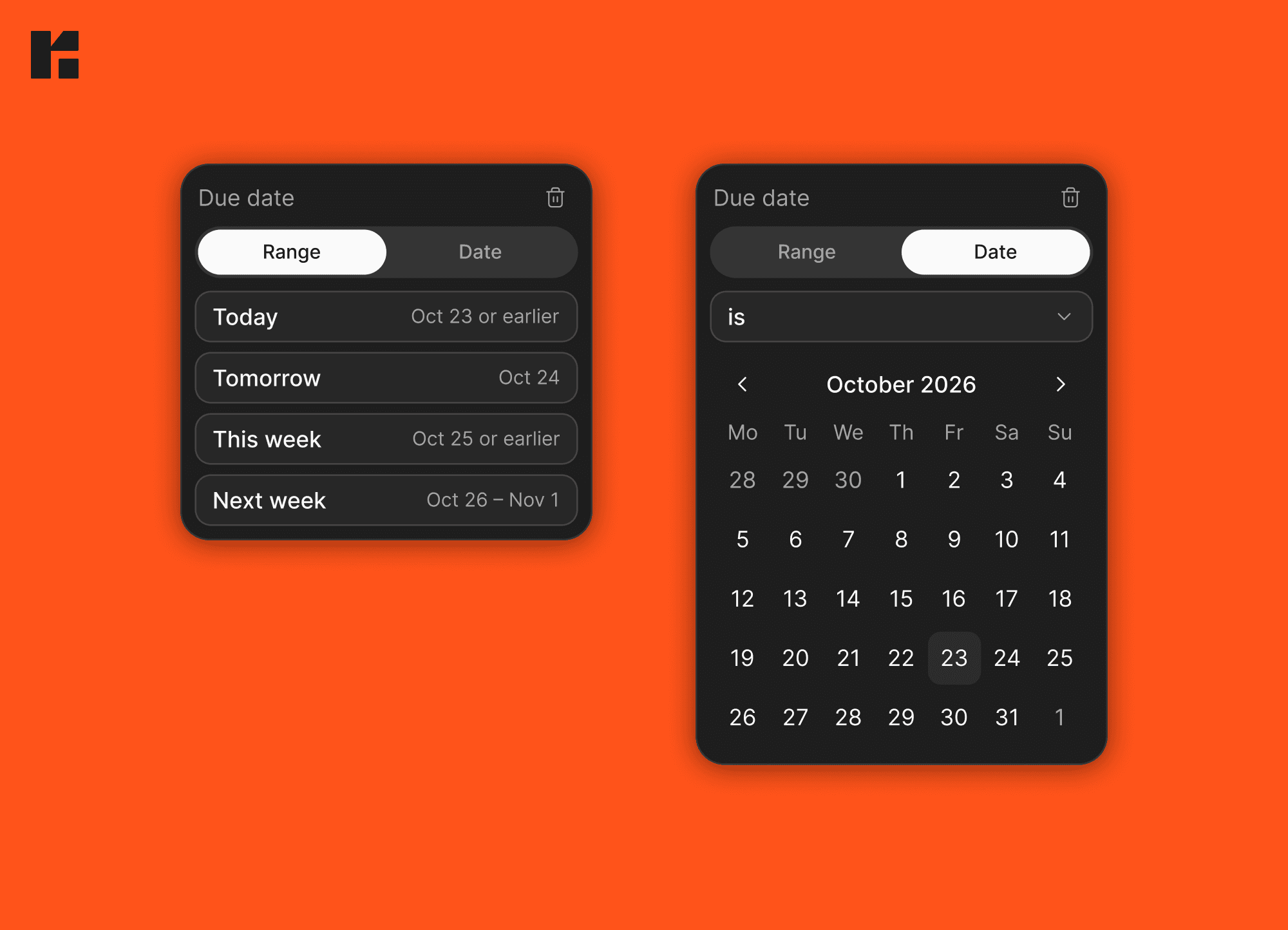
A Today view, built from the due date
Filter any tasks list by Due date with Today, Tomorrow, This week or Next week. The ranges follow the calendar: Today is today plus everything overdue, and tomorrow it is tomorrow's. Save the filter on a list and you have a Today page. The date condition's editor is two pages now, Range and Date, on web, Mac and iPhone.
Select many, then act
On web and Mac, select items on any layout with a ⌘-click, a Shift-click range, ⌘A, or a marquee drawn over empty space. Selected cards turn Roma Red with a checked circle and keep their shape, and a drag carries the whole selection as one stack with its count. The table's rows join the same selection, so ⌘K acts on them too. ⌘K leads with what you can do to the selection, offers Remove due date beside Set due date, keeps finished tasks findable for eight hours, and its @ picker learns what you pick.
Faster on the Mac and the iPhone
We've completely rewritten the Mac and iPhone apps, and you can feel the difference. Open an item, switch views, edit a list: everything feels fast and snappy. Give them a try and feel it for yourself.
All updates
Sidebar sections on web and Mac: New section, Rename section and Delete section from the sidebar's menu, lists moved in by drag or Move to, and every section reorderable, Favorites and Shared with me included.
Experts and Memory are Settings pages now, out of the sidebar.
Pin to sidebar on any list, from its menu or by dragging it into the top block beside Tasks and Automations; drag it out to unpin.
A list under Shared with me can be filed into any section or pinned, and dragged back.
The iPhone's Lists page draws the Mac's sections: make, rename, hide and drag a section by its header, and a new list is typed inside its section. Hidden sections and their order sync between the iPhone and the Mac.
The iPhone's Lists page leads with your pinned lists; pin and reorder on the phone, and Settings → Navigation → Sync pinned lists lets this iPhone keep its own pins.
The Tasks page's list pills, Move to and the list picker follow your sidebar's order, sections and pins included.
Show tasks from all lists: a switch on the Tasks list brings every list's tasks onto the Tasks page, with a pill per list.
Filter by Due date with Today, Tomorrow, This week or Next week; the ranges follow the calendar, and the date condition's editor has a Range page and a Date page.
Select many on web and Mac: ⌘-click, Shift-click, ⌘A or a marquee; selected cards turn Roma Red with a checked circle and keep their shape, a drag carries the selection as one stack with its count, and the table's rows join the same selection.
⌘K shows what you can do first, keeps finished tasks findable for eight hours, and the @ picker learns what you pick. Its Set due date page offers Remove due date.
Sort any list by Date added or Last edited, both always in view in Sort, and add either one as a property to any list: a column, a pill and a row in the item, filled in by Roma.
The title column has a header menu: rename it there or in Edit list, hide it from the table, and drag it among the other columns.
Board columns rearrange under every grouping, Status and Due date included, and keep their order on the list.
Create a select option from any picker: type a value the list does not have into an item's pill, its menu or ⌘K and it is added to the list.
A member of a shared list adds, edits and deletes its properties, Status and Due date included.
A tasks list gets a blank Assigned to column when it is first shared.
Created by can be added as a property on a shared list, and an item's menu names who created it.
@ in a shared item lists the people on it first.
Items added, assigned, completed or moved in one go arrive as one update, and items moved into a shared list tell its members like added ones.
Someone joining a shared list shows up in Updates, never as an Operator message.
A person's face is in colour only while they are on the item, and Viewed shows when they were last on it.
The Operator can act on an item a member created in a shared list from its first turn.
Typed titles are tidied on every list, a list without properties included: an obvious slip in a well-known name is fixed once Roma has looked it up, and a value the list has no option for becomes a new option.
Copy for agent is on every item's menu, including items in lists shared with you.
A task that already has a conversation opens on its own chat from the sidebar, and a draft stays with the chat it was typed in.
Keyboard on every dialog, menu and picker: the share dialog's suggestions take the arrow keys and Enter, ⌘Enter shares, and the popover menus are real menus.
⌘N starts a new task from every view in the Mac app and on web.
A link into the Mac app opens its own tab in front instead of replacing the one you were in.
On a table, New item scrolls the new row into view, and Enter twice opens the item you just typed.
Right-click the Tasks row in the sidebar for the list's own menu, Edit list included.
Archive list asks first.
Moving items between lists no longer crashes the page or shows the row back at its origin, and an item moved onto a filtered list stays visible when the filter is "is not" something it lacks.
Drag and drop fixes: a table row dropped at a new slot stays there, every column drags to any slot, the sidebar's rows slide out of the way again, a second item drags after moving one, and rows no longer jump when deleting from a table.
Fixed: dropdown options hidden behind the feedback dialog, Edit list from the sidebar menu opening in two motions, Shared with me opening on its own after a notification, and the sidebar and page rows vanishing until a reload in the Mac app.
An automation that runs out of steps ends with a line saying where it stopped, a run that made a task links it, and the run page shows the step it stopped at.
The Mac app and the web app draw only the rows on screen in every layout, open menus in the click's frame, and redraw one pill when you type a title.
Opening an item on iPhone no longer waits on a loading placeholder, and the editor is ready as the page opens.
Roma fits the iPhone Duo in every pose; open, a task sits beside its list.
Talk without opening Roma, a switch under Settings → Action Button, runs the Action Button take from the Dynamic Island; press the button again to send.
Dictation lands after recording by default; Live stays a choice and says it is less accurate.
A task the Operator created keeps its row after it is deleted, title struck through.
Polish: the people picker opens straight onto the list, and an expert's "stepped back" line shows in its message.
The Learn library is live on roma.app, with short articles on every part of Roma and Learn in the site's header.