A Log on every item and list
Roma now keeps a Log on every item and list: who changed what and when, a diff of every edit, and every earlier version ready to restore. You can also comment on a passage of any item, every task list has an Assigned to column, your tasks take files up to 20 MB, and the Operator has a new face.
A Log on every item and list
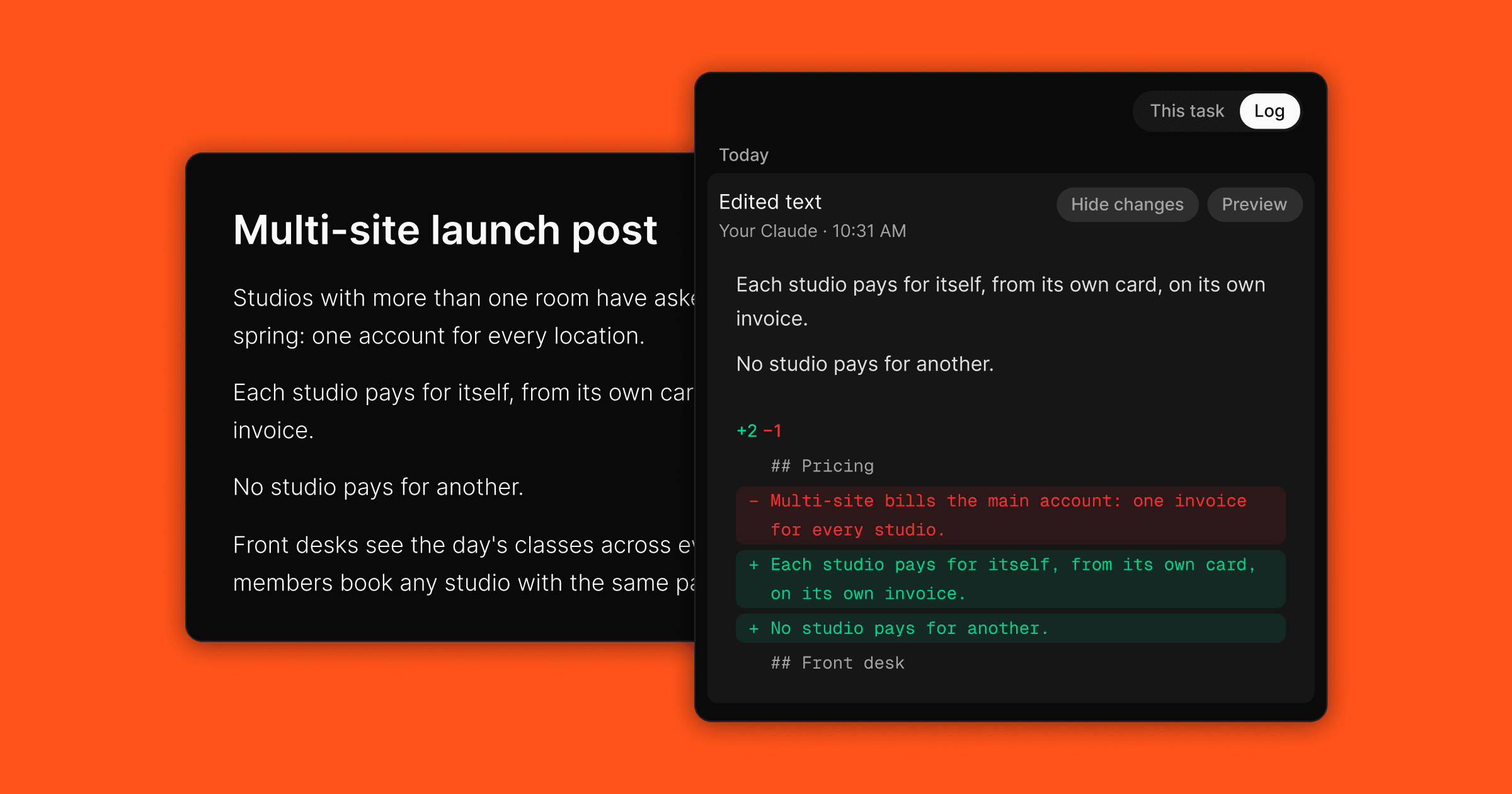
Open any item or list and switch to Log. Every change is a worded line saying who made it and when, whether that was you, a teammate, the Operator or an AI agent you connected to Roma. Roma keeps every edit to a body as a diff, and shows it: on the web and the Mac, open an edit's Changes fold to see the removed lines in red and the added lines in green, with a count of each, so you know exactly what an agent changed in your text. A picture added shows as a thumbnail, a file with its size, and a change of formatting alone says so. The Log is also the version history: preview any earlier version and restore it. Versions never expire, every member of a shared item or list can read its Log and restore too, and moving an item to another list keeps its chat and its Log.
Comment on a passage of any item
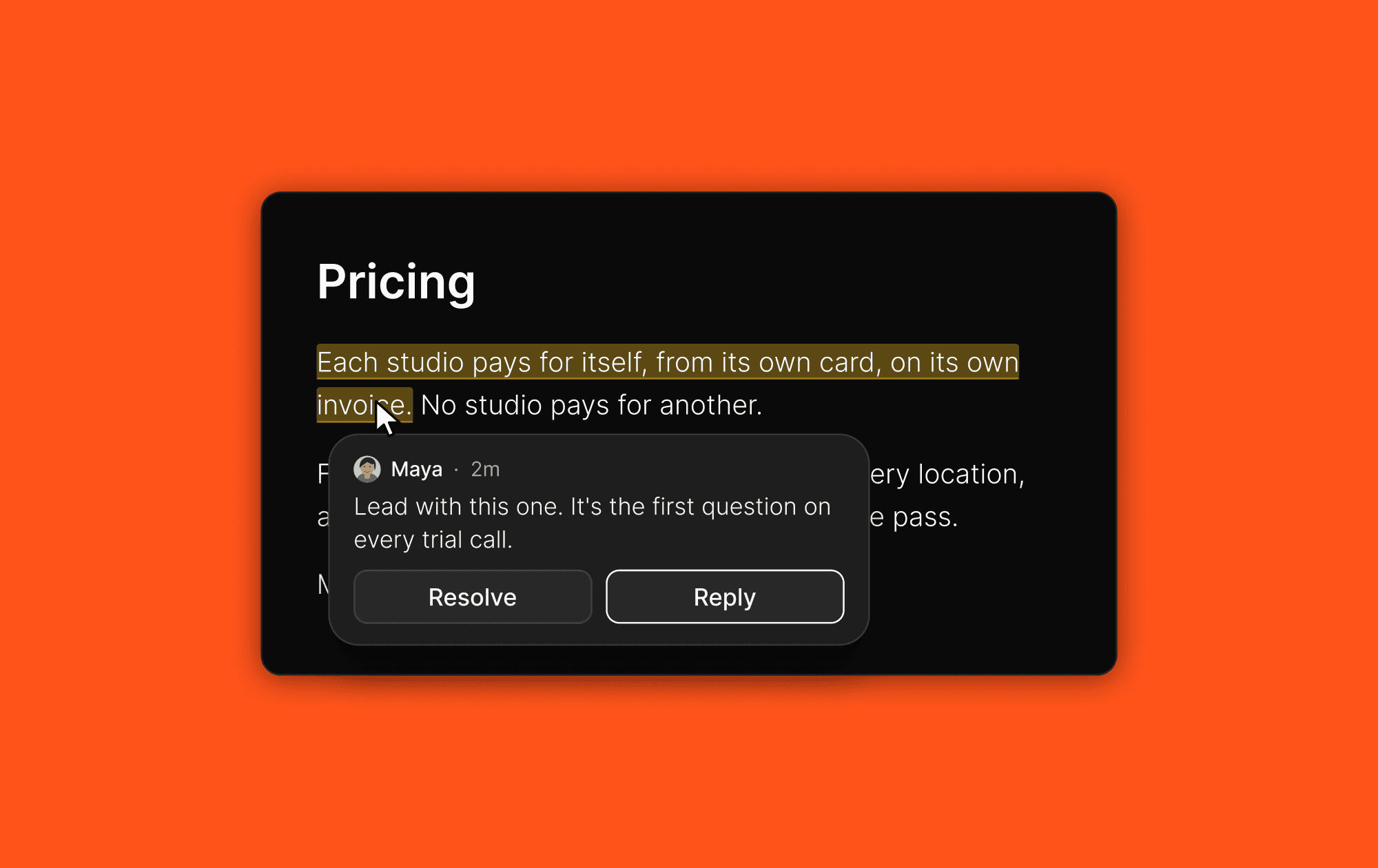
Highlight a passage in an item's body and comment on it, whether the item is private or shared. The quote under your comment is a link: click it and the body scrolls back to the passage. On a shared item, everyone sees the same thread, and someone you invite shows as joined only once they first open the item or list.
Assigned to on every task list
Every task list has an Assigned to column from the start, with one picker showing the people on the list. Tasks assigned to someone else stay out of your views by default; the People section of Show tasks brings them back. An assigned task shows the person's face on its row, and the face with the name on a full card. Ask the Operator to assign a task to a teammate and it does, and a task whose title names someone on the list is assigned to them as you create it.
Files on your tasks, and the Operator reads them
Attach files up to 20 MB in chat and in an item's body, or from a folder on your Mac. Ask the Operator to put a Dropbox file on a task and it lands there, from your own chat or a shared conversation. Ask about a PDF or text file attached to an item and the Operator reads it. On Tasks from email, every task has Open in Gmail.
The Operator has a new face
The Operator now wears a Roman helmet: on its pill in the sidebar, on the iPhone's Chat tab and beside its replies in chat. At rest it blinks now and then, and while the Operator works on a reply, it moves.
All updates
Ask the Operator to assign a task to a teammate, and it does, naming the person in its reply.
A task whose title names a member of the list is assigned to them as it is created; two names assign both where the column allows several people.
Ask the Operator or a connected AI to share an item or a list, invite someone, turn the link on or off, pin a list, archive, follow or mute, or bring something back from the trash, and it does. On the Mac and the iPhone, with the next update.
Every item and list keeps a Log: every change is a worded line, and each body edit has a Changes fold with the lines that moved, a picture as a thumbnail, a file with its size.
The Log is the version history: preview an earlier version and restore it, and on a shared item or list every member can too. Versions never expire.
Moving an item never touches its chat or its log; a "moved" line is all that is added.
In the rail, the switch reads This task and Log; on the iPhone, the chat sheet reads Thread and Log on every item and list.
Comment on a passage of any item, shared or not; the quote under the comment is a link that scrolls the body to the passage.
A list you joined stands in your Lists section and as a pill on the Tasks page, like your own.
Inviting is not joining: you hear "joined" when the person first opens the item or list.
Members of a shared item edit everything the owner can, the fields, the archive and their own move included.
A shared item's link unfurls with its title on a Roma card.
Sharing a list with many items no longer fails partway.
Everyone on a shared item sees the same chat panel.
Mention @Operator in any chat, private ones included.
Assigned to is a fixed column on every task list, with one clean picker; Allow several people is a switch in List settings.
Tasks assigned to someone else are hidden from your views by default; the People section of Show tasks shows them.
An assigned task shows the person's face on its row, the face alone on a compact row, the face and the name on a full card.
View settings belong to the list and follow you to every device; the Tasks page has its own view for every task on it.
The Tasks page draws every task one way: status, title and due date, with the ID behind its own switch.
In the table layout, Status is the first column, and the ID stands ahead of it when shown. The ID leads the row everywhere.
Find any task by its ID in ⌘K, whatever its age and whether or not its list shows the ID. On the iPhone's search, with the next update.
A list has an ID too: it heads the list's menu, with Copy list ID beside Copy link, and a prefix can carry a hyphen. An item's menu reads Copy task ID or Copy item ID. On the Mac and the iPhone, with the next update.
Attach files up to 20 MB in chat, in an item's body and from a folder on your Mac.
Ask the Operator to put a Dropbox file on a task and it lands there, in your own chat or a shared conversation.
The Operator reads a PDF or text file attached to an item.
Open in Gmail on every task on Tasks from email.
The New task dialog's Details box is the body editor, and every chat bar types the way a body does; picking a date in the dialog no longer closes it.
A task that was once finished is findable again in ⌘K, Recent and search. Recent shows what you opened yourself, and search leaves out tasks finished more than eight hours ago.
A chevron on every item's detail takes you to its list.
Right-click a list in the sidebar and List settings opens the list's settings page.
Select mode never opens a task; filtering by a completed status shows completed tasks; a task dropped on a pinned list moves there.
Every settings page shares one layout.
One code block in chat, with Copy and Download on hover.
Stopping the Operator leaves its reply as it was.
A paused Messages check never runs on its own, and View automation opens its page.
On the iPhone, the chat no longer opens with every task; Open the chat by default is a switch under Settings → Tasks.
On the iPhone, the voice capsule's check puts the words in the chat bar instead of sending them.
The Tasks widget wears the Roma logo and name.
On the iPhone Duo, Search, the plus and a page's options stand in the bar again, and the Operator's transcript scrolls.
From the last edition, now on the iPhone: pictures in a gallery, members editing a shared list, the sources row under a web search answer, and a new task no longer standing on a filtered page it does not belong to.
Deleting your account finishes, with its progress shown, even on a large workspace.
On the Mac, a click on the Dock icon brings the window back, every time.
A member's edit made through their own AI is signed as the member.
Polish: the stop button is filled again, ⌘K's selection count matches what you checked, a marquee selects only the rows of the list it is drawn on, the sidebar's selected card reads right on the Bone and Clay looks, the rail's bulletin rows show their spinner alone, the New row says task or item by the list's shape, the remove button on the iPhone's pickers is an eraser, a new expert's page has Cancel and Save, and the iPhone's formatting bar matches the rest of the app.